Blocnet Edge
Know what to act on first.
Edge reads every update on the gems you follow and sorts them into act now and watch, with the reason for each in plain words.
Illustrative brief.
How it decides
Four signals, one score.
Every update on your gems gets a score from four weighted signals.
35%
Urgency
The priority the hunter sets on the update: high, medium or low.
30%
Freshness
How new it is. An update fades over about three days.
20%
Your alert level
Whether it meets the alert level you set for that gem. Updates below it count for less.
15%
Novelty
Whether it landed in the last day, three days or week.
An update whose window closes within three days is always act now, whatever else it scores.
Edge only looks at gems you follow, and skips anything hidden by moderation.
What you get
Act now, watch, or nothing.
The score becomes one of three calls, and every call says why.
- Act now
A strong score, a window closing soon, or a fresh urgent update. Do something about it.
- Watch
Worth knowing, nothing to do yet. Keep an eye on it.
- Nothing to do
Edge leaves it out, so your list stays short.
Up to three reasons per call
- Its window closes in 2 days
- Marked urgent
- Posted 3 hours ago
- Meets the alert level you set for this gem
So you can check any call in a second, instead of taking it on trust.
In the app
Where you see it.
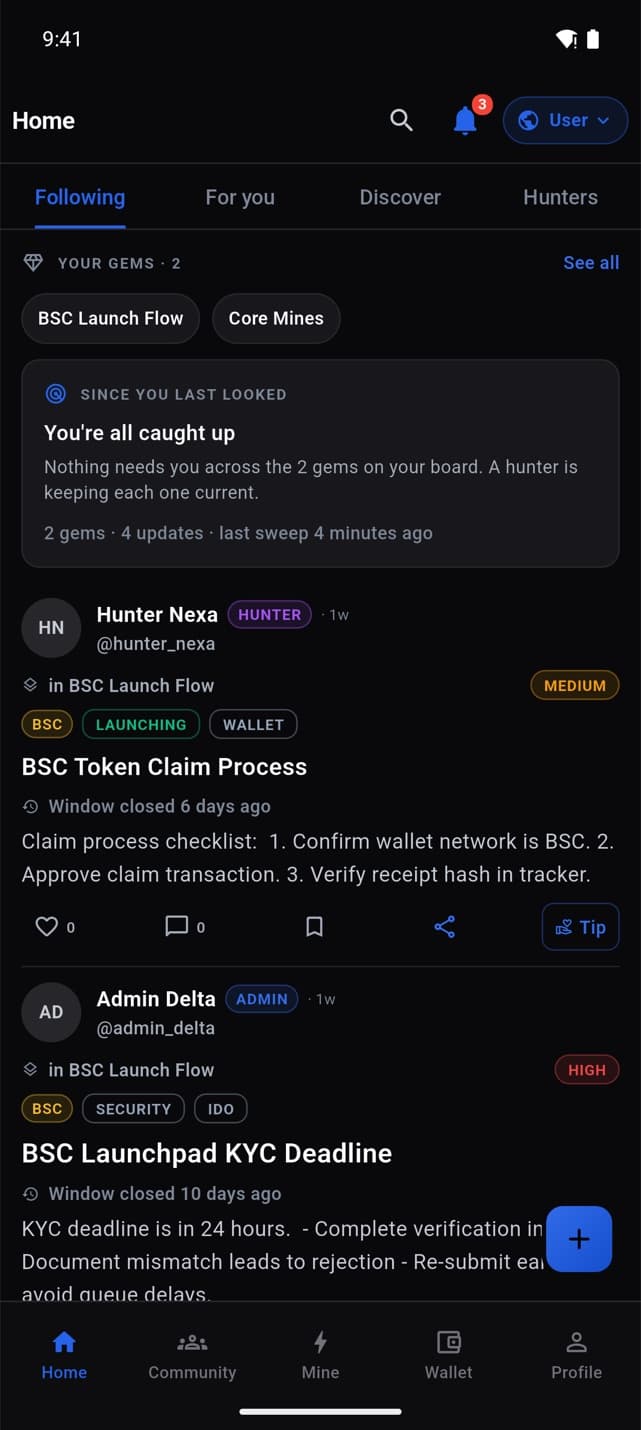
Edge sits where you already look, and stays quiet when nothing needs you.
- 1
Edge panel on Home
Under your gems on Home › Following. When nothing needs you, it says so in one line.
- 2
ACT NOW pill
On feed cards that need you. Tap it for “Why Edge flagged this”, with the reasons.
- 3
The Edge screen
Everything Edge ranked for your gems, act-now first, over the last week.
Your say
Built with you.
What your feedback does today, and what comes next.
Tell Edge how it did
Every “Why Edge flagged this” sheet has Helpful and Not helpful. Your answer is saved, and the team reads the counts when tuning Edge.
Coming to Edge
- Learning from your Helpful / Not helpful taps. Today they are saved for the team, not yet used in the ranking.
- Hunter reliability as a signal in the ranking.
- An AI read of each update’s text. It runs in the background and isn’t shown to members yet.